 Post-Op
After surgery the doctor sees only the exceptions.
FideSana Post-Op asks the patient every day how they are, and uses the doctor's thresholds to decide who needs attention. The rest are calm, and the doctor is not bothered by extra notifications.
How it works
There is no clinical number in the system by itself. Every threshold comes from the protocol filled in by the doctor, and both the app and the board follow it.
The doctor fills in the protocol
In their own protocol the doctor decides what the app asks the patient, when, and at what threshold the team is notified. FideSana does not fill in or change these numbers. The protocol takes effect only after the doctor's personal confirmation.
The patient joins with the clinic code
In the Post-Op app the patient enters the clinic code (from a QR code or by hand). Registration is anonymous. The name and phone number reach the doctor in encrypted form.
After surgery the clinic activates
The doctor or an assistant activates the patient on the board. This starts the follow-up and counts as one activation for billing. Pressing it again does not create a second record.
The patient sends a check-in
On the doctor's schedule the app asks about temperature, pain, water or symptoms, depending on what the doctor has switched on. The answer is encrypted on the phone itself.
The red alert reaches the right person
If an answer matches the doctor's red rule, it appears on the board with a sound and a mark. Who receives it first, and who it passes to if there is no confirmation, is set by the doctor's chain (doctor, nurse on duty).
A missed check-in does not bother the doctor
If the patient does not send an answer, the reminder goes first to the patient, then to their relative, and last to the clinic assistant. It is not sent to the surgeon unless the situation turns red.
What it looks like
Real screens with test data: the doctor's board, the patient list and the patient's phone.
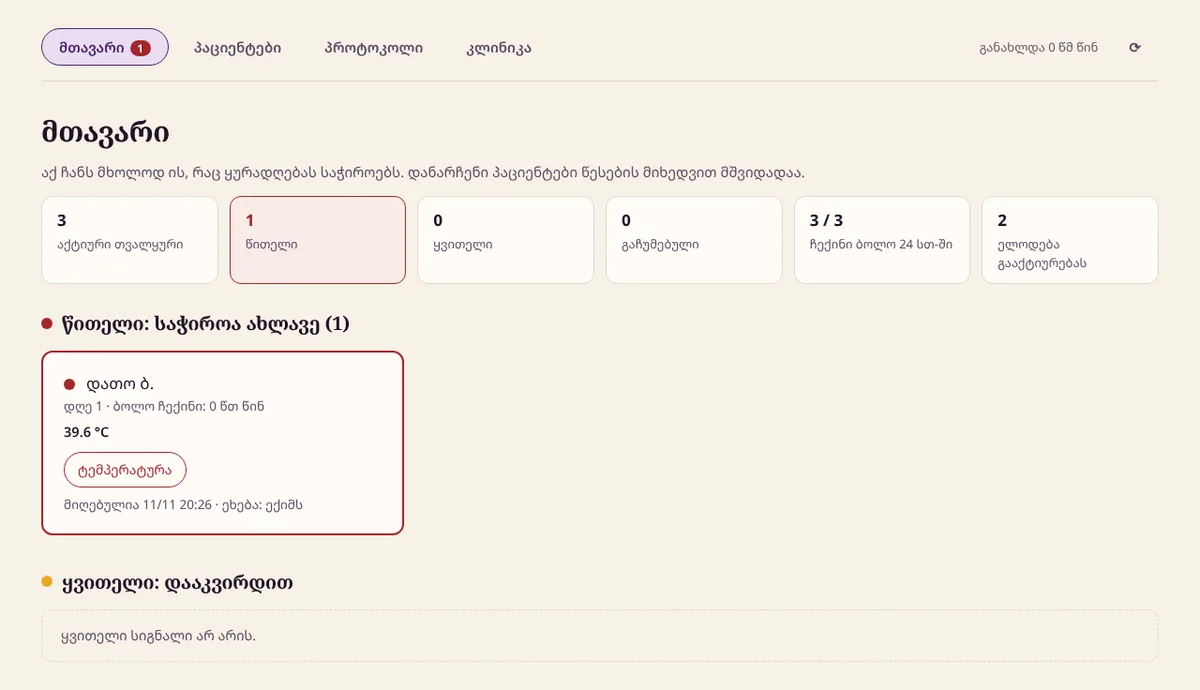
Doctor's board
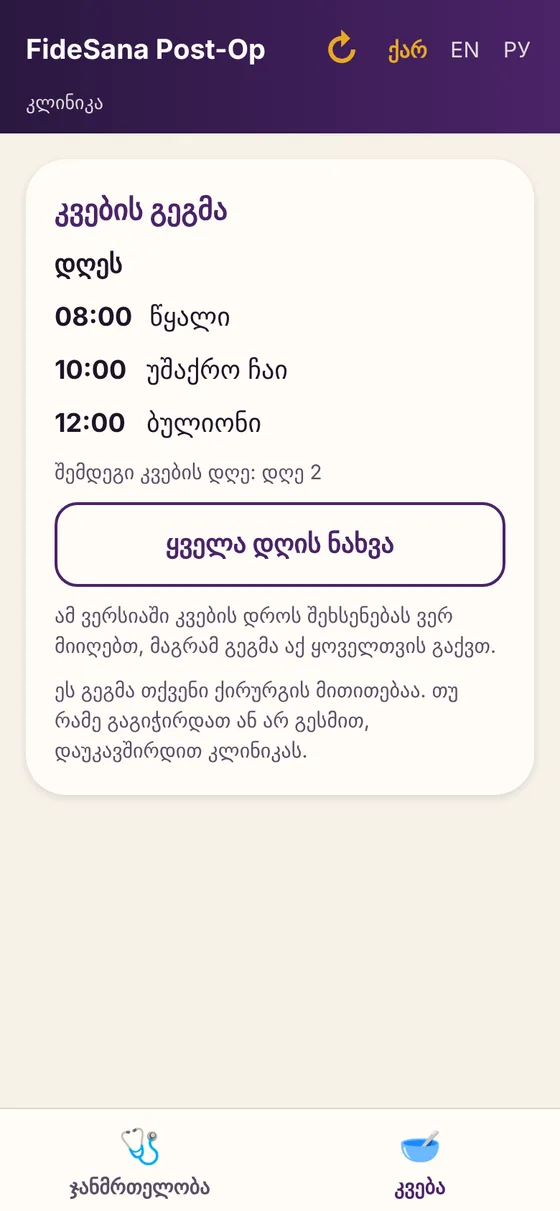
Patient's phone
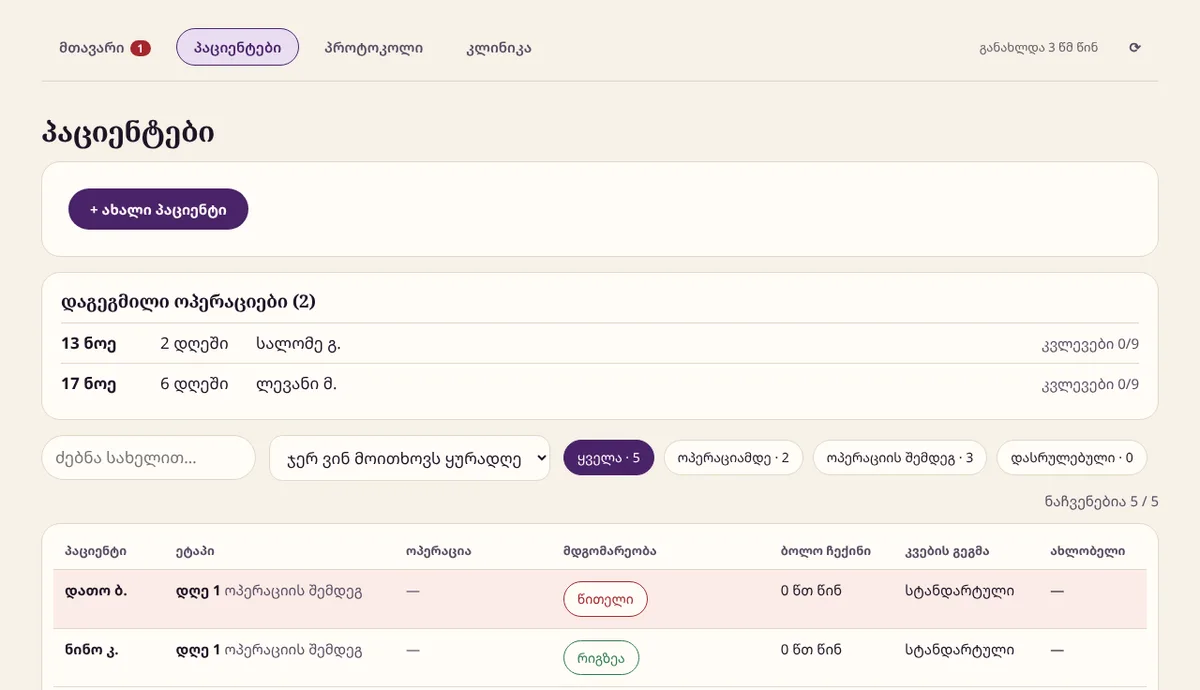
Patient list
Try it yourself
This is an illustration, and the patient and number data are made up. Click the red entry the way a doctor would.
The doctor's time comes first
The system makes sense only if it saves the doctor time. That is why the board makes a sound only when it is really needed.
The board shows the exceptions
Red, yellow and silenced patients are at the top, calm ones below. Everything does not look equally urgent.
Yellow does not make a sound
Yellow rules are for observation. Sound and notification belong to red.
Escalation stops only after the doctor confirms
The red alert stays until someone confirms that they have seen it and are acting. If the doctor does not confirm in time, it passes to the person on duty according to the chain.
The summary is ready for printing
At the end of the post-operative period the doctor prints, with one button, a summary of check-ins, water and complications, depending on what was switched on in the protocol.
Security, simply
Health data is read only by the doctor and their team, in their own browsers. FideSana cannot read them.
What we cannot see
- The patient's name, phone and relative's contact
- Temperature, pain, water, symptoms and notes
- How a particular patient feels
- The thresholds of the doctor's protocol, linked to the patient
What we see
- Clinic and doctor accounts
- For how many patients follow-up was activated and when (for billing)
- A randomly generated patient number with no name behind it
- Temporarily: the mark of an emergency check-in until the doctor confirms. After that it is deleted from the history
The key is created in the doctor's browser
The doctor's encryption key is created in their browser and stored in protected form with a secret phrase. The phrase never goes to the server.
The phrase cannot be recovered
If the doctor forgets the phrase, the patients' encrypted data cannot be opened. This is the price of security, so we warn the doctor about it from the start.
A team member uses their own key
The nurse on duty does not need the doctor's phrase. Patient data is opened with separate keys for the doctor and for the assistant.
A relative cannot see health data
The relative's page shows only whether the patient needs to be contacted and how many hours have passed since the last check-in.
Frequently asked questions
Short, direct answers.
Who sets the thresholds?
Only the doctor. FideSana does not set thresholds for temperature, pain or water in advance. The protocol takes effect after the doctor's confirmation, and a confirmed version no longer changes: a change creates a new version.
What happens if a patient misses a check-in?
First the patient is reminded, then a relative, then the clinic assistant. It is not sent to the surgeon. The doctor sets the timing in the protocol.
Who sees the patient's name?
The doctor and their clinic's assistants, in their own browsers. The FideSana operator sees only the number of activations.
How is billing calculated?
One record is created for each activated patient. We agree the price and terms with the clinic.
Which phone does the patient app work on?
Only Android for now. The doctor's board is in the browser and opens on any computer or phone.
How do we get started in our clinic?
Write to us from the FideSana page. We create the accounts for the doctor and the nurse on duty, and the doctor creates their own key at first sign-in.